Skip to content
  • Categories
  • Recent
  • Tags
  • Popular
Skins
  • Light
  • Brite
  • Cerulean
  • Cosmo
  • Flatly
  • Journal
  • Litera
  • Lumen
  • Lux
  • Materia
  • Minty
  • Morph
  • Pulse
  • Sandstone
  • Simplex
  • Sketchy
  • Spacelab
  • United
  • Yeti
  • Zephyr
  • Dark
  • Cyborg
  • Darkly
  • Quartz
  • Slate
  • Solar
  • Superhero
  • Vapor

  • Default (No Skin)
  • No Skin
Collapse
Brand Logo

Saillogger Community

  1. Home
  2. Feature Requests
  3. Display other N2K data in Sail Logger?

Display other N2K data in Sail Logger?

Scheduled Pinned Locked Moved Feature Requests
22 Posts 7 Posters 28.0k Views 5 Watching
  • Oldest to Newest
  • Newest to Oldest
  • Most Votes
Reply
  • Reply as topic
Log in to reply
This topic has been deleted. Only users with topic management privileges can see it.
  • M Offline
    M Offline
    MacJL
    wrote on last edited by MacJL
    #10

    Thank you ! I’m playing with it, and I’m able to monitor some new data !

    First feedback : in the selection of path, it seems to be sorted by plugin name. It may be difficult to find the path you need. For example, in my configuration, the tanks.* (N2k source) paths are shown before electrical.* (Venus plugin)

    1 Reply Last reply
    0
    • I Offline
      I Offline
      ilker
      wrote on last edited by
      #11

      Thanks, that's a great point. There is more work to do in the selection of paths and it will be coming but in the meantime, we just deployed a quick change to sort those alphabetically!

      1 Reply Last reply
      0
      • M Offline
        M Offline
        MacJL
        wrote on last edited by
        #12

        I did some more tests :

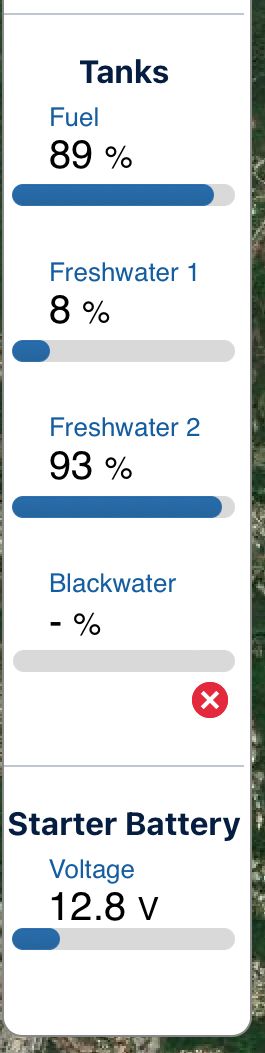
        IMG_0513.jpeg

        The blackwater tank is at 0%. But it is shown "-". Is that normal ?

        And for starter battery, the graph seems to show it is almost discharged at 12.8v. What are the up and down limits of this graph?

        I 1 Reply Last reply
        0
        • D Offline
          D Offline
          dbrown308
          wrote on last edited by
          #13

          Curious if i add these additional monitoring sources do they then become a part of my trip logs? This would be a complete game changer as I would have trip/log info on egt and coolant temps for reference.

          I 1 Reply Last reply
          0
          • M MacJL

            I did some more tests :

            IMG_0513.jpeg

            The blackwater tank is at 0%. But it is shown "-". Is that normal ?

            And for starter battery, the graph seems to show it is almost discharged at 12.8v. What are the up and down limits of this graph?

            I Offline
            I Offline
            ilker
            wrote on last edited by ilker
            #14

            @MacJL Looks like there is no data coming for your Blackwater, which is different than a 0% coming in. We just deployed a change to treat missing/null values as zero, so it should address the UI glitch. However you should ensure you do have readings for your blackwater tank.

            On the latter point on ranges, they are set dynamically based on all the values in a given section. It does make it a bit more meaningful when you have multiple readings in a given section. There might be an option to customize it in the future but for now, we will leave it with the default dynamic ranges.

            1 Reply Last reply
            0
            • D dbrown308

              Curious if i add these additional monitoring sources do they then become a part of my trip logs? This would be a complete game changer as I would have trip/log info on egt and coolant temps for reference.

              I Offline
              I Offline
              ilker
              wrote on last edited by
              #15

              @dbrown308 That's one of the upcoming features! You will be able to capture everything in the monitoring page (including custom monitoring elements) as part of your trip logs.

              1 Reply Last reply
              0
              • adminA Offline
                adminA Offline
                admin
                wrote on last edited by
                #16
                Curious if i add these additional monitoring sources do they then become a part of my trip logs? This would be a complete game changer as I would have trip/log info on egt and coolant temps for reference.
                

                The capability to integrate additional monitoring directly into trip logs is here with Plugin 4.0!

                This major update allows you to capture custom NMEA 2000 data—like depth, battery levels, fuel levels, engine hours and more—seamlessly within your trip logs.

                📢 Check out the full announcement: Plugin 4.0: A Game-Changer for Saillogger!

                1 Reply Last reply
                0
                • M Offline
                  M Offline
                  MacJL
                  wrote on last edited by
                  #17

                  Thank you for this new capabilities. I'll test them as soon as possible 🙂

                  But is there a way to add a SignalK path, that is not currently existing? For example, the engine temperature path is created only when it's running. So I can select it in custom monitor page, or add it manually...

                  1 Reply Last reply
                  0
                  • adminA Offline
                    adminA Offline
                    admin
                    wrote on last edited by
                    #18

                    Hi @MacJL, that's an interesting case. Currently, there isn't a way to add it manually, but that shouldn't be necessary. If you check Saillogger about an hour after the engine starts running, the path should show up automatically. It will remain available even after the engine stops, as long as Signal K isn’t restarted.

                    1 Reply Last reply
                    0
                    • M Offline
                      M Offline
                      MacJL
                      wrote on last edited by MacJL
                      #19

                      Hello,
                      Sure it will work. But as I generally configure the sailloger app remotely, I can't start the engine from my house !
                      And when I'm on board, I usually forget to set it ! And of course, I often reboot the SignalK device just after sailling, before setting this damn path to Sailloger...

                      I will try to find a way to declare this path with a null value, just to set it in Sailloger. This could be a good workaround for my case. I'm pretty sure I can do it with Data Fiddler.

                      1 Reply Last reply
                      0
                      • M Offline
                        M Offline
                        MacJL
                        wrote on last edited by
                        #20

                        Ok, found it. I just pushed that in Server/Data Fiddler :
                        {"updates":[{"values":[{"path":"propulsion.port.temperature","value":0}]}]}
                        Then restart the Sailloger plugin. Wait a minutes, and now I can configure the path.

                        1 Reply Last reply
                        2
                        • S Offline
                          S Offline
                          SV_Atlas
                          wrote on last edited by
                          #21

                          Is it possible to add more wind and boat speed data? Items such as AVG TWS (selectable time scale), AVG AWS, AWA, AVG SOG, etc?

                          Thanks in advance and for your consideration.

                          1 Reply Last reply
                          0
                          • adminA Offline
                            adminA Offline
                            admin
                            wrote on last edited by
                            #22

                            Hi @SV_Atlas , it is possible to add any NMEA 2000 data monitoring and with plugin version 4 they are also associated with your trip logs. Please see the announcement here: Plugin 4.0: A Game-Changer for Saillogger!

                            We have also published a video tutorial explaining how to use this functionality: Saillogger NMEA 2000 Monitoring

                            Let us know if you encounter any problems using it.

                            1 Reply Last reply
                            0

                            Hello! It looks like you're interested in this conversation, but you don't have an account yet.

                            Getting fed up of having to scroll through the same posts each visit? When you register for an account, you'll always come back to exactly where you were before, and choose to be notified of new replies (either via email, or push notification). You'll also be able to save bookmarks and upvote posts to show your appreciation to other community members.

                            With your input, this post could be even better 💗

                            Register Login
                            Reply
                            • Reply as topic
                            Log in to reply
                            • Oldest to Newest
                            • Newest to Oldest
                            • Most Votes


                            Powered by NodeBB | Contributors
                            • Login

                            • Don't have an account? Register

                            • Login or register to search.
                            • First post
                              Last post
                            0
                            • Categories
                            • Recent
                            • Tags
                            • Popular