
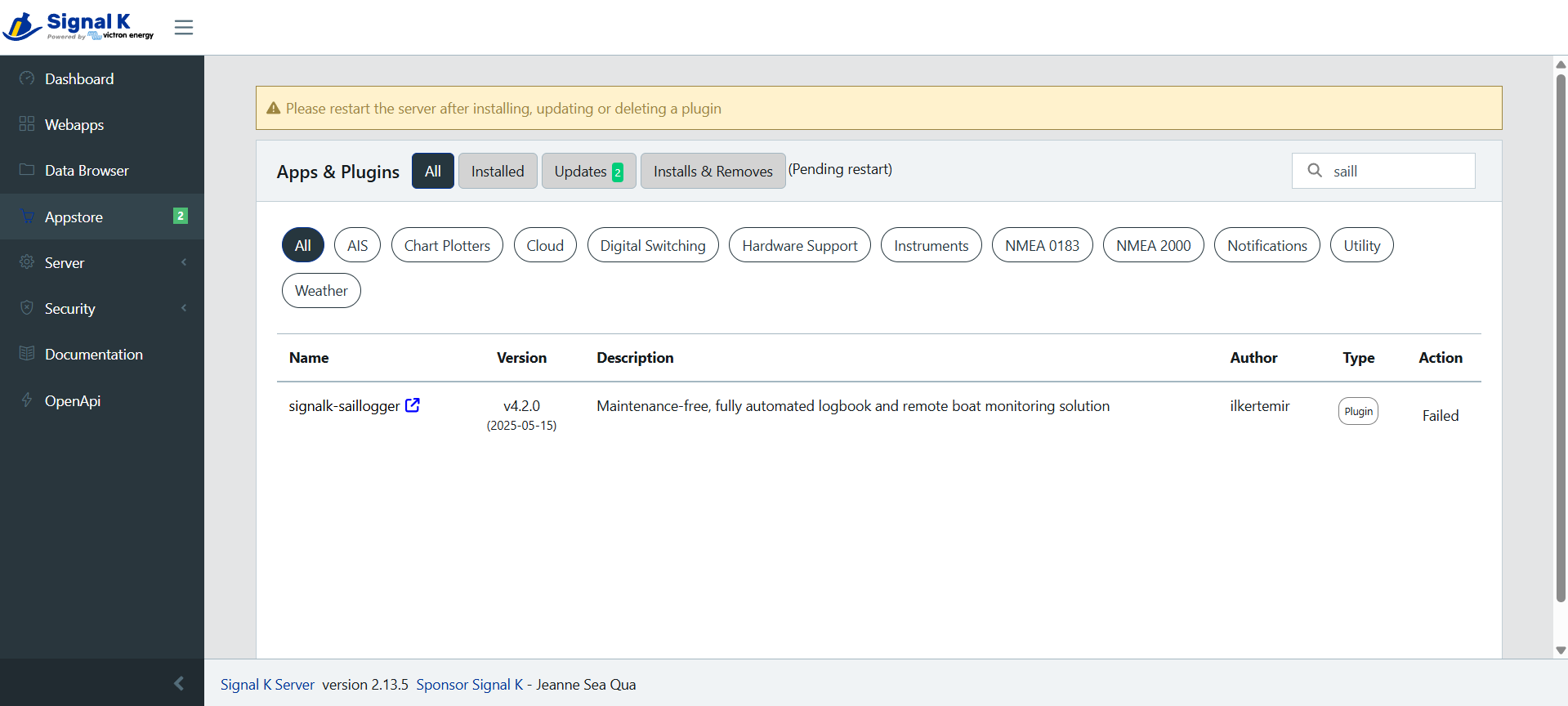
FIXED: Saillogger plugin fails to install on Venus OS v3.62
-
Hi Andrea,
Thanks for your inquiry.
I’ve tried every version of VenusOS from 3.55 through to the latest beta release candidate [3.70-7] with the same results. 3.62 was no different [and is where I started from with the first install failures.] Saillogger 4.21 fails installation [as does the derived-data plug-in…] in every attempt in every V OS tried so far…
I’ll be patient and see how things evolve on the Victron end…
Cheers, Bill
@wrwakefield Actually a case study. Since you have the Cerbo GX have you ever installed a plugin in SK? because it seems strange that in a native configuration like that of version 3.50 with Venus Large, Signal K can give problems, I have used numerous Cerbo even with versions prior to 3.50 and both Signal K and Node Red have always worked well. Of course in Signal K has it made your login and password and do you access with those correctly?
-
Hi Andrea,
The irony is Saillogger is working well since I installed it. [Although something went wrong on the Saillogger end and they sent an email indicating they took care of it so my new account could go live.]
RE: Logging into Venus.local SignalK: Yes. It won’t let me see the app store until I log in to SignalK. It shows all installed apps and plug-ins, and those with updates. It shows the ‘installing’ status when an update is selected, but to date all have ‘failed’.
It could be something is fubared in my local SignalK install, but since Saillogger continues to operate despite not being able to upgrade, I’ll just let it slide for a while to see if it is me or my instance, or a fix is introduced along the way…
Thanks again.
Cheers, Bill
-
Hi Andrea,
The irony is Saillogger is working well since I installed it. [Although something went wrong on the Saillogger end and they sent an email indicating they took care of it so my new account could go live.]
RE: Logging into Venus.local SignalK: Yes. It won’t let me see the app store until I log in to SignalK. It shows all installed apps and plug-ins, and those with updates. It shows the ‘installing’ status when an update is selected, but to date all have ‘failed’.
It could be something is fubared in my local SignalK install, but since Saillogger continues to operate despite not being able to upgrade, I’ll just let it slide for a while to see if it is me or my instance, or a fix is introduced along the way…
Thanks again.
Cheers, Bill
@wrwakefield Sorry last suggestion, have you tried asking on the Victron website?
-
Nothing to be sorry about, Andrea.
We all try to assist each other on these forums, and I appreciate your feedback…
I have perused the Victron sites but not posted yet. Since Saillogger is working despite my ministrations, I figured I would hold out until the next Venus update is released [mentioned as impending in a Victron Professional update I received recently.]
Crossing fingers…
Cheers, Bill
-
Nothing to be sorry about, Andrea.
We all try to assist each other on these forums, and I appreciate your feedback…
I have perused the Victron sites but not posted yet. Since Saillogger is working despite my ministrations, I figured I would hold out until the next Venus update is released [mentioned as impending in a Victron Professional update I received recently.]
Crossing fingers…
Cheers, Bill
@wrwakefield Good luck
-
@wrwakefield, sorry to hear the problems you encountered. v3.62 and Saillogger Plugin 4.2.1 should work alongside other plugins, we also use v3.62 ourselves and run many additional plugins beyond Saillogger. It’s possible that Signal K became corrupted in the process; have you tried restarting the Cerbo GX completely? If you did and it didn’t work, completely removing it and re-configuring may be the best thing to do.
This will require root access to Cerbo GX though. Instructions are here but please read the warnings carefully.
Please follow these steps after obtaining root access:
- Stop Signal K process (Toggle off Signal K in Venus OS menu) - This is important
- SSH into Venus OS
- Delete the Signal K directory by issuing the command rm -rf /data/conf/signalk
- Exit ssh by exit or closing the terminal
- Start Signal K process
This will give you a fresh, brand new Signal K instance. That also means all your previous configuration will be lost. You will need to download the Signal K plugin again and configure it. Make sure you wait long enough for installing the plugin and do not interrupt it. It can take longer than 30 minutes.
Let us know if this helps.
-
Thank you for your detailed response.
RE: rebooting the Cerbo: I have performed numerous cold and warm boots of the Cerbo during this process with the same end results.
Before seeing your response, I was pondering performing a ‘factory reset’ [and only that] on the Cerbo.
I am considering this in case other aspects of my Cerbo GX Mk2 Venus install also have issues I haven’t noticed yet… [All seems to perform normally sans the app store install/upgrade issue in SignalK…]
Your suggestion is a good one and more surgical in that it only resets SignalK. Do you know if Victron’s reset also deletes the SignalK directory [as per your SSH command?]
Since we are full time cruisers, and since we are on the cusp of shoving off again for a few months into very remote areas, I am being cautiously pragmatic in an effort to avoid bricking the Cerbo through my ineptitude. [It can take weeks to receive packages up here…]
Thanks again for your time.
Cheers, Bill
-
Hi @wrwakefield ,toggling Signal K on or off doesn't delete the Signal K configuration. We haven't explicitly tested the factory reset but pretty sure it would wipe out Signal K configuration as well.
We regularly delete the Signal K config to test out things from scratch, it has never caused an issue but of course operating on the CLI requires diligence. Just make sure "Signal K" toggle is off before you delete that directory. I don't think it is a showstopper if you don't but it is safer to do so.
-
Hi @wrwakefield ,toggling Signal K on or off doesn't delete the Signal K configuration. We haven't explicitly tested the factory reset but pretty sure it would wipe out Signal K configuration as well.
We regularly delete the Signal K config to test out things from scratch, it has never caused an issue but of course operating on the CLI requires diligence. Just make sure "Signal K" toggle is off before you delete that directory. I don't think it is a showstopper if you don't but it is safer to do so.
-
I am happy to report back that everything is now working as it should [SignalK, etc.] after performing a Victron ‘factory reset’ on my Cerbo GX Mk2 running Venus 3.62.
Saillogger is now upgraded to 4.2.1 [~45min install time] and I was able to install the derived-data plug in as well. [Now that I have derived the required value for true wind direction, I can add to Windy’s collection of Wx data.]
I have no doubt that I would have accomplished the same [SignalK] results following your suggestion of SSH deleting the SignalK config file, but decided to use Victron’s full reset to rule out any other lurking issues that I hadn’t noticed. [After all, I hadn’t done anything with SignalK myself, but somehow the original install had issues.]
I look forward to leveraging SignalK on my boat; inspired in no small part by your excellent example of what can be accomplished.
Thank you for all of your guidance.
Warm regards, Bill
SV Denali Rose
-
I am happy to report back that everything is now working as it should [SignalK, etc.] after performing a Victron ‘factory reset’ on my Cerbo GX Mk2 running Venus 3.62.
Saillogger is now upgraded to 4.2.1 [~45min install time] and I was able to install the derived-data plug in as well. [Now that I have derived the required value for true wind direction, I can add to Windy’s collection of Wx data.]
I have no doubt that I would have accomplished the same [SignalK] results following your suggestion of SSH deleting the SignalK config file, but decided to use Victron’s full reset to rule out any other lurking issues that I hadn’t noticed. [After all, I hadn’t done anything with SignalK myself, but somehow the original install had issues.]
I look forward to leveraging SignalK on my boat; inspired in no small part by your excellent example of what can be accomplished.
Thank you for all of your guidance.
Warm regards, Bill
SV Denali Rose
@wrwakefield I had no doubts that everything would be fine. These guys at Saillogger are very concrete and good. Hurray!
-
Hi @SV_Atlas, a factory reset should be the last resort. First, try a clean install of Signal K—step‑by‑step instructions are in this post: https://community.saillogger.com/topic/111/new-install-wont-start/2?_=1753236272577
Let us know if that doesn’t resolve the issue or if you need help with any of the steps
-
 A admin unpinned this topic on

Hello! It looks like you're interested in this conversation, but you don't have an account yet.
Getting fed up of having to scroll through the same posts each visit? When you register for an account, you'll always come back to exactly where you were before, and choose to be notified of new replies (either via email, or push notification). You'll also be able to save bookmarks and upvote posts to show your appreciation to other community members.
With your input, this post could be even better 💗
Register Login