Skip to content
  • Categories
  • Recent
  • Tags
  • Popular
Skins
  • Light
  • Brite
  • Cerulean
  • Cosmo
  • Flatly
  • Journal
  • Litera
  • Lumen
  • Lux
  • Materia
  • Minty
  • Morph
  • Pulse
  • Sandstone
  • Simplex
  • Sketchy
  • Spacelab
  • United
  • Yeti
  • Zephyr
  • Dark
  • Cyborg
  • Darkly
  • Quartz
  • Slate
  • Solar
  • Superhero
  • Vapor

  • Default (No Skin)
  • No Skin
Collapse
Brand Logo

Saillogger Community

  1. Home
  2. General Discussion
  3. Installation Problem

Installation Problem

Scheduled Pinned Locked Moved General Discussion
16 Posts 4 Posters 5.0k Views 3 Watching
  • Oldest to Newest
  • Newest to Oldest
  • Most Votes
Reply
  • Reply as topic
Log in to reply
This topic has been deleted. Only users with topic management privileges can see it.
  • adminA Offline
    adminA Offline
    admin
    wrote on last edited by
    #4

    That's odd, what is the error message you are seeing?

    1 Reply Last reply
    0
    • G Offline
      G Offline
      Gerler
      wrote on last edited by
      #5

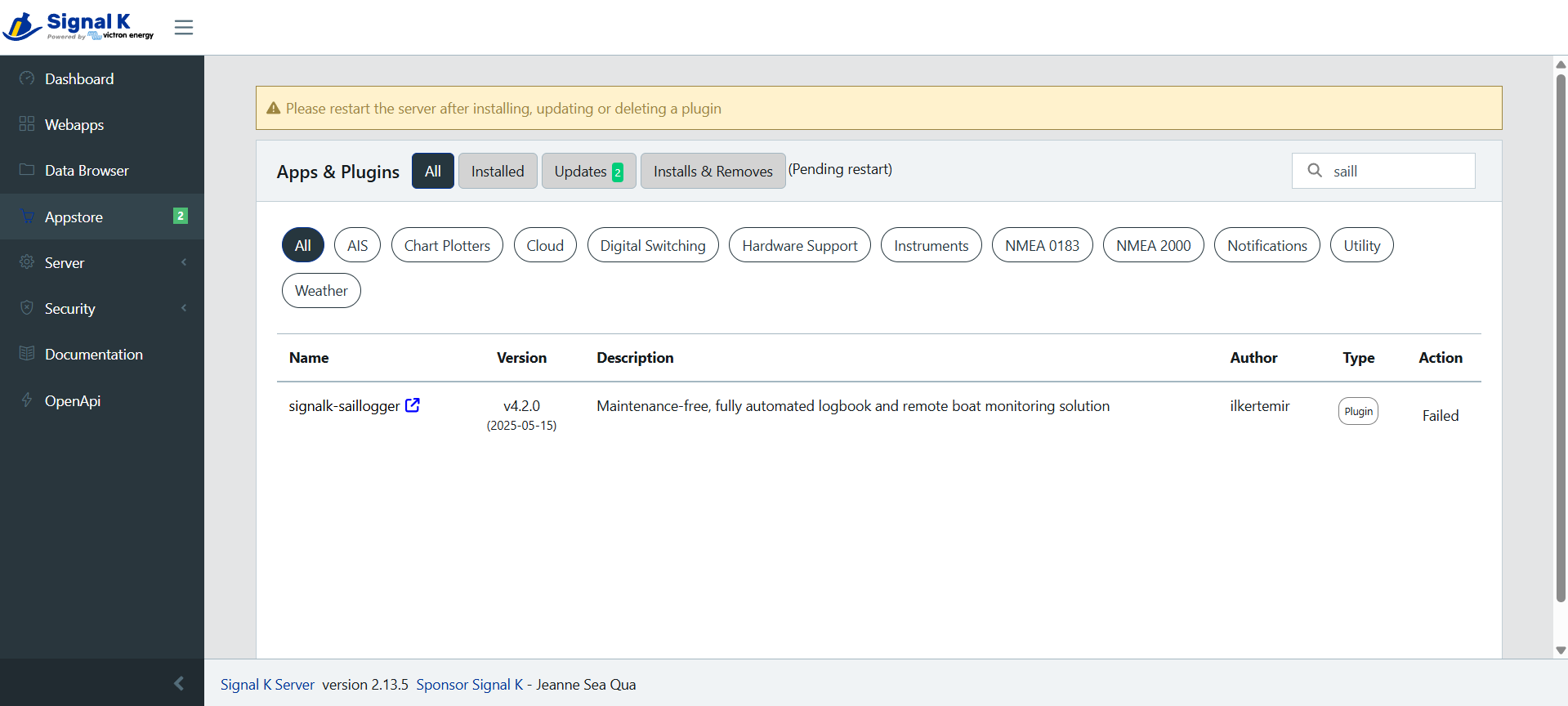
      Installing:

      96f6abba-49f7-4b3c-8641-6d5725437d17-image.png

      And Failed after 2/3 minutes:

      32037559-ab8d-462d-a5a4-e8d4448505c8-image.png

      1 Reply Last reply
      0
      • G Offline
        G Offline
        Gerler
        wrote on last edited by
        #6

        Update: Did a clean install on Cerbo GX, Updated to 3.60 firmaware Version. Started Signal K Server. Just configure user privileges and tried to install only Saillogger. Get the same Failed message.

        1 Reply Last reply
        0
        • G Offline
          G Offline
          Gerler
          wrote on last edited by
          #7

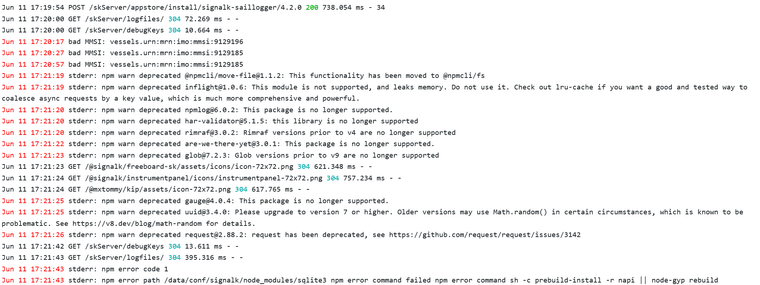
          Let me know if this helps:

          image.png

          1 Reply Last reply
          0
          • G Offline
            G Offline
            Gerler
            wrote on last edited by
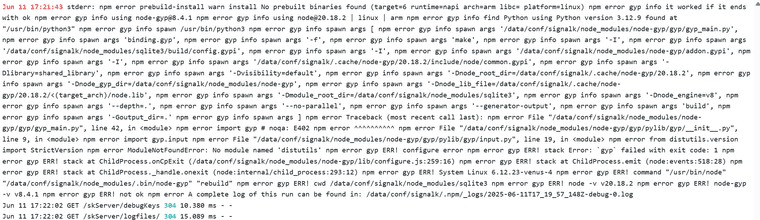
            #8

            image.png

            1 Reply Last reply
            0
            • G Offline
              G Offline
              Gerler
              wrote on last edited by
              #9

              Hello there. After logs analysis, Python update solved the issue.
              SH at Cerbo and run this commands:
              opkg update
              opkg install python3-pip

              Take more than 1 hour but worked fine.
              Thanks

              1 Reply Last reply
              0
              • adminA Offline
                adminA Offline
                admin
                wrote on last edited by
                #10

                Ok, glad it is solved but this is super awkward, Saillogger plugin has absolutely nothing to do with Python. There must be something else happening in the system, but not sure what it might have been.

                1 Reply Last reply
                0
                • G Offline
                  G Offline
                  Gerler
                  wrote on last edited by
                  #11

                  Yep, very awkward. An I did a factory reset on Cerbo GX many times and tried with minimal configuration parameters and firmware update. At Signal K Server, just security config, nmea 2000 connection and derived data plugin and always same error. So last resource was to dig at logs with AI and that whtas solved.

                  1 Reply Last reply
                  0
                  • adminA Offline
                    adminA Offline
                    admin
                    wrote on last edited by
                    #12

                    Thanks, @Gerler. It turns out the problem is specific to the latest Venus OS (v3.62). Appreciate you uncovering the workaround! We’re coordinating with Victron on a permanent fix. In the meantime, we’ve posted the details here:
                    Link Preview Image
                    FIXED: Saillogger plugin fails to install on Venus OS v3.62

                    IMPORTANT NOTE: This issue has been resolved in Saillogger Signal K plugin version 4.2.1. In collaboration with Victron, we identified the root cause and fix...

                    favicon

                    Saillogger Community (community.saillogger.com)

                    1 Reply Last reply
                    0
                    • J Offline
                      J Offline
                      jonnys
                      wrote on last edited by
                      #13

                      Thanks for the update. I experienced the same problem with 3.60 even after a factory reset of cerbo.

                      1 Reply Last reply
                      0
                      • adminA Offline
                        adminA Offline
                        admin
                        wrote on last edited by
                        #14

                        @jonnys This issue has been resolved in Saillogger Signal K plugin version 4.2.1. In collaboration with Victron, we fixed it by rebuilding the dependency in a different way. Please install Signal K Saillogger plugin version 4.2.1 and let us see if you see any issues.

                        1 Reply Last reply
                        0
                        • A Offline
                          A Offline
                          Andrea
                          wrote on last edited by
                          #15

                          Hello to all saillogger friends, unfortunately I had not read this post before and I installed the 4.2.1 update which obviously did not install. However, there is a variant in my case that I would like to report, I still have version 3.55 and although this version is reported as the one on which 4.2.1 works, in my case it is not installed, could there be a solution in my case?


                          1 Reply Last reply
                          0
                          • adminA Offline
                            adminA Offline
                            admin
                            wrote on last edited by
                            #16

                            This was resolved in a different thread. Upgrading to the latest Victron firmware and installing Saillogger plugin 4.2.1 or later will work.

                            1 Reply Last reply
                            0

                            Hello! It looks like you're interested in this conversation, but you don't have an account yet.

                            Getting fed up of having to scroll through the same posts each visit? When you register for an account, you'll always come back to exactly where you were before, and choose to be notified of new replies (either via email, or push notification). You'll also be able to save bookmarks and upvote posts to show your appreciation to other community members.

                            With your input, this post could be even better 💗

                            Register Login
                            Reply
                            • Reply as topic
                            Log in to reply
                            • Oldest to Newest
                            • Newest to Oldest
                            • Most Votes


                            Powered by NodeBB | Contributors
                            • Login

                            • Don't have an account? Register

                            • Login or register to search.
                            • First post
                              Last post
                            0
                            • Categories
                            • Recent
                            • Tags
                            • Popular